GPath Laser
Boolean
Last updated Oct 26, 2026, 7:48 PM
1. Start
Click Boolean in Tools, then select two overlapping closed shapes on the canvas.
2. Right sidebar
Operation
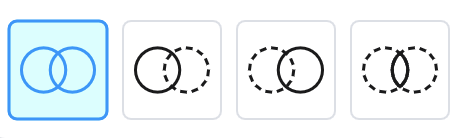
Pick from the icon row:
| Operation | Result |
|---|---|
| Union | Merge into one outline |
| A − B | Cut the second shape out of the first |
| B − A | Reverse subtraction |
| Intersect | Keep overlap only |
Hover icons to preview the outcome on the bed.
Selection
Exactly two shapes are needed for subtract and intersect. Click vectors to change the operand pair.
3. Apply
Apply replaces the pair with a single merged region named "Merged vectors N". Cancel closes the tool.
Laser tips
Create complex shapes by merging the required parts of multiple vectors, removing the sections which are not required.