GPath Laser
Start Position Selection
Last updated Oct 14, 2026, 6:31 PM
1. Why start position matters
A closed Line cut/engrave is a loop. Where the loop begins affects:
- where the first pierce / witness mark lands
- how bridges / tabs sit relative to the entry
- and which corner or edge the head approaches first after travel moves, useful for reducing travel
GPath Laser lets you choose the start position in the Laser Simulator, so the pick matches the path the beam will follow.
Start picking applies to closed Line operations only. Fill and Image engraving do not offer start anchors.
2. Open the simulator and load a Line operation
Switch to the Laser Simulator central tab. Use Load in the toolbar to load one Line operation, or Load all to preview every operation together.
Only closed Line vector cuts show pickable anchors. Open paths, Fill, and Image jobs are skipped.
3. Enable selection
In the simulator toolbar (far right of the view row), turn on Select start positions.
| What happens | Detail |
|---|---|
| Valid anchors | Small dots appear on every pickable corner and edge midpoint along the cut path |
| Click | Sets the start for that shape and refreshes the live toolpath preview |
Turn the toggle off when you are finished picking.
Optimize start positions
With Select start positions on, turn on Optimize start positions. Each closed Line vector's start is placed so travel between consecutive shapes (and from home to the first position) is as short as possible. Using the same corners and edge midpoints you can click.
Clicking an anchor yourself turns optimize off so that pick is kept. Needs two or more shapes.
4. Multi-shape Line operations
When one Line operation cuts several shapes, each shape keeps its own start anchor. Picking on shape A does not move the start on shape B.
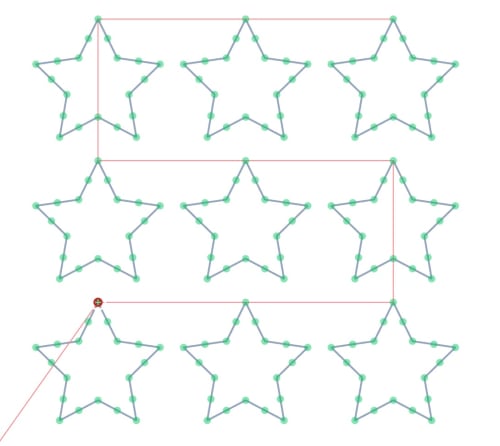
With Load all, every loaded Line operation that supports starts shows its anchors. Each anchor belongs to the operation and shape it came from.
5. Canvas markers (optional)
You can show start markers on the 2D Drawing canvas without entering pick mode:
| Control | Where |
|---|---|
| Start positions eye toggle | Below the Laser operations list |
| Show Toolpath Start Positions | View menu |
These markers are for reference only. To change a start, use Select start positions in the Laser Simulator.
6. Tips
- Avoid placing the start where a tab must bridge the entry, tabs may shift to avoid conflicting with the start.
- If no dots appear, confirm a closed Line operation is loaded, Select start positions is on, and the shape type supports start picking.