GPath Laser
Offset
Last updated Oct 14, 2026, 6:31 PM
1. Activate
The offset tool is used to create a copy of a selected vector, offset either inward or outward. creating an inflated or deflated copy of the original.

Select closed paths, then click Offset in Tools.
2. Right sidebar
Amount
| Field | Description |
|---|---|
| Amount | Offset distance in mm or inches. The canvas preview updates as values are updated |
Direction
| Option | Description |
|---|---|
| Outward | Expands the selection |
| Inward | Shrinks them |
| Both | Creates inner and outer copies in one step |
Corners
| Option | Description |
|---|---|
| Rounded | Smooth offset corners |
| Sharp | Pointed mitres |
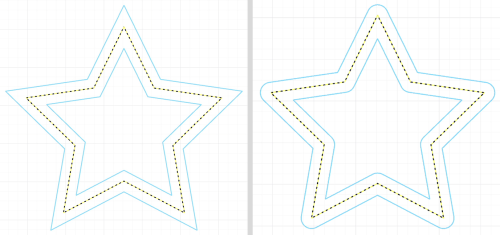
Selection
Add or remove shapes by clicking them while the panel is open.
3. Apply
Apply adds a new offset path. Cancel closes without changes.
Laser tips
Create decorative rings or repeated patterns from a single outline.