GPath CNC
Installation
Last updated Oct 14, 2026, 6:31 PM
Welcome to the GPath CNC documentation. Here you will find information about using the software including installation, drawing, creating CNC toolpaths, and saving/exporting for use on your CNC machine.
Download
- Download GPath CNC from the product page. Use the Free trial section to download for your operating system.
Your browser may flag new .exe downloads:
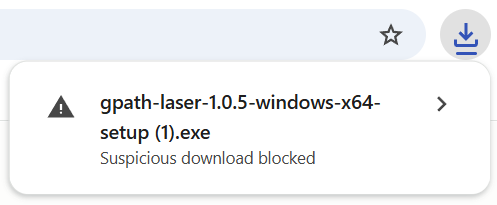
Click on the download and choose Keep / Download anyway. Downloads from gpathsoftware.com are built by us and signed. You can confirm the publisher before opening it:
How do I verify the signature?
- Right-click gpath-cnc-…-setup.exe
- Properties → Digital Signatures
- You should see LAYERSIX DIGITAL LIMITED listed > details > “This digital signature is OK”
Windows users: If SmartScreen appears, click More info → Run anyway.
- Launch the app — your 30-day device trial starts on first run (internet connection required).
- Design, generate toolpaths, and export G-code for your machine.
Need a licence?
Purchase a monthly or lifetime licence from your dashboard after creating an account.
Documentation
- Getting started — first project, workspace tour
- Drawing — shapes, paths, editing, and layout tools
- Toolpaths — profile, pocket, drill, ramping, and leads
- Raised text — relief lettering with nested pocket subtract