GPath CNC
Boolean
Last updated Oct 14, 2026, 6:31 PM
1. Open the tool
Click Boolean under Tools. Select shapes on the canvas, two shapes are required for most operations.
2. Right sidebar — Boolean
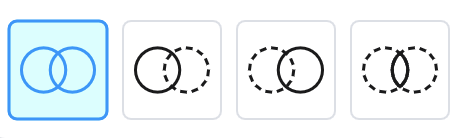
Operation
Choose an operation icon:
| Operation | Result |
|---|---|
| Union | Combines both shapes into one region |
| A − B | Subtracts the second shape from the first |
| B − A | Subtracts the first shape from the second |
| Intersect | Keeps only the overlapping area |
Hover an icon to preview the result on the canvas.
Selection
The panel reports how many shapes are selected. Click shapes to set operands A and B (first selected = A, second = B for difference operations).
3. Apply or cancel
Apply creates a new Merged vectors region and removes the original two shapes. Cancel exits without changes.
CNC notes
Boolean regions work with Pocket toolpaths to clear complex areas. Order matters for A − B — select the outer boundary first (often a Square or imported region), then the island to subtract.
For raised lettering, prefer nesting text inside an outline and using pocket Subtract nested shapes so the wording stays editable — see Raised text. Boolean A − B is an alternative when you want a single merged region instead.